> ## Documentation Index
> Fetch the complete documentation index at: https://api-docs.rabot.energy/llms.txt
> Use this file to discover all available pages before exploring further.
# 3rd Party Authorization: Customer Data
> Integrate the RABOT Tariff into your application increasing user value fast!
## Process overview
A customer can grant your application access to their data by an approval process similar to the OAuth access flow. This involves the following steps:
call [create customer link](/api-reference/customers/create_customer_linking) to receive an `authorizationUrl` link.
Send the user to this link in a browser window or webview. The user will be asked to log in using the credentials they used when creating their energy supply contract.
After login, the user will be asked to grant your application access to their personal and contract related data stored on the Rabot platform.
When the user approves, the web view will be redirected to the webpage defined by the `successUrl` parameter in Step 1, and you will be able to access the users data via the API.
```mermaid Customer linking flow theme={null}
---
config:
theme: default
look: neo
---
sequenceDiagram
participant API
participant Client As Client application
participant Browser As Browser / Web View
Client->>API: POST /customer/link
activate API
API->>Client: return link URL
deactivate API
activate Client
Client->> Browser:redirect to link URL
deactivate Client
activate Browser
Browser ->> API: Authenticate and grant access
deactivate Browser
activate API
API ->> Browser: redirect to successURL
deactivate API
activate Browser
Browser ->> Client: return customerNo
deactivate Browser
activate Client
Client ->> API: access customer data
deactivate Client
```
## Example flow
### Get authorization Url
Call [create customer link](/api-reference/customers/create_customer_linking), providing `successUrl` and `failureUrl`. Note that these can include additional state information, such in this example the `xyz34567` path parameter that could be a customer identifier, session id or security token in your application.
```shell customer linking request theme={null}
curl -L 'https://api.rabot-charge.de/partner/v1/customers/link' \
-H 'Content-Type: application/json' \
-H 'Authorization: ••••••' \
-d '{
"successUrl": "https://your.application.com/customer-link-success/xyz34567",
"failureUrl": "https://your.application.com/customer-link-error/xyz34567",
"customerNoQueryParameterName": null,
"externalCustomerId": "test-1"
}'
```
```json linking response theme={null}
{
"authorizationUrl": "https://auth.rabot-charge.de:443/connect/authorize?client_id=partner-demo-link&state=qNtxsqHoGIe82Zm27MF5XGH%2bspYllHDeo%2byG6iq8TPOSrGmzfIU3Kd999K38zxygMaCdMH1Q8XFkIDALCbyJR2Dqhdld67yvby6UbINubefcndk5vjyIbcfxIF0kJ2heJTPfmJcVxhqJulh57O4COEiJdtRVSJVvjBIEYBBmDAhqyzFUWyIi1T9cztNtyukpeO9Z4W9oNdvUY4GUQf4xMhKudteeoEJREXXDgo30I7qQOiX"
}
```
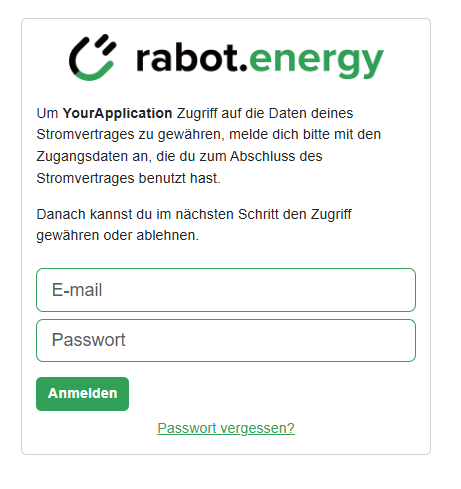
### User login in browser / webview
Using this Url in a browser, the user will first see a login screen:
 ### Authorization
When the user successfully logs in, the Rabot platform will present an approval request screen:
### Authorization
When the user successfully logs in, the Rabot platform will present an approval request screen:
 ### Redirect to application
When the user approves, the browser is redirected to your `successUrl`, and the customer number is appended to the Url as a query parameter:
`https://your.application.com/customer-link-success/xyz34567?customerNumber=46491184`
In case the user rejects the approval request, the browser is redirected to the `failureUrl`:
`https://your.application.com/customer-link-error/xyz34567?error_description=The+authorization+was+denied+by+the+end+user.&error_name=access_denied`
Note that if the login fails due to wrong or missing credentials, the login screen does *not* redirect to the `failureUrl`, but instead shows an error message to the users, allowing them to try again.
### Access user data
With the `customerNumber` returned in the redirect to `successUrl` above, you can then query customer and contract information, e.g. by calling the [list contracts](/api-reference/customers/list_contracts) endpoint:
```bash theme={null}
curl -L 'https://api.rabot-charge.de/partner/v1/customers/46491184/contracts' \
-H 'Authorization: ••••••'
```
## Managing user reference Ids
The API offers different ways for you to match customer data in the RABOT platform with the data in your own platform.
1. As shown in the example above, when the user is redirected after granting your application access to their data, the `successUrl` link is extended with a query parameter `customerNo` that contains the unique customer number of this customer in the RABOT platform. You can store this number together with the customer information in your platform, and then use it to query the customer's data via API using the `customerNo` as path variable as shown above.
2. You can also add an `externalId` parameter to the [create customer link](/api-reference/customers/create_customer_linking) call. This information is then stored with the customer data in the RABOT platform, and you can use it as a filter to the [list customers](/api-reference/customers/list_customers) API call to access the customer's data.
## Handling different partner accounts
In the RABOT platform, customers and contracts are always "owned" by a particular partner account. All B2C business under the Rabot Energy brand is part of the rabot-charge account, whereas business created as part of a whitelabel partnership is managed in separate partner accounts.
By default, you can only link customers that belong to one partner account, defined by your partnership type:
* **Sales and Integration partners**: By default, you can only link customers from the rabot-charge account
* **Whitelabel partners**: By default, you can only link customers from your own account
If enabled in your partnership setup, you can also link customers from other accounts. To do this, you have to specify the partner account in the `authAs` parameter in the [create customer link](/api-reference/customers/create_customer_linking) call.
For example, as a whitelabel partner, you can link customers with a Rabot Energy contract:
```shell customer linking request theme={null}
curl -L 'https://api.rabot-charge.de/partner/v1/customers/link' \
-H 'Content-Type: application/json' \
-H 'Authorization: ••••••' \
-d '{
"successUrl": null,
"failureUrl": "null,
"customerNoQueryParameterName": null,
"authAs": "rabot-charge"
}'
```
The created `authorizationUrl` link will now show Rabot Energy branding:
### Redirect to application
When the user approves, the browser is redirected to your `successUrl`, and the customer number is appended to the Url as a query parameter:
`https://your.application.com/customer-link-success/xyz34567?customerNumber=46491184`
In case the user rejects the approval request, the browser is redirected to the `failureUrl`:
`https://your.application.com/customer-link-error/xyz34567?error_description=The+authorization+was+denied+by+the+end+user.&error_name=access_denied`
Note that if the login fails due to wrong or missing credentials, the login screen does *not* redirect to the `failureUrl`, but instead shows an error message to the users, allowing them to try again.
### Access user data
With the `customerNumber` returned in the redirect to `successUrl` above, you can then query customer and contract information, e.g. by calling the [list contracts](/api-reference/customers/list_contracts) endpoint:
```bash theme={null}
curl -L 'https://api.rabot-charge.de/partner/v1/customers/46491184/contracts' \
-H 'Authorization: ••••••'
```
## Managing user reference Ids
The API offers different ways for you to match customer data in the RABOT platform with the data in your own platform.
1. As shown in the example above, when the user is redirected after granting your application access to their data, the `successUrl` link is extended with a query parameter `customerNo` that contains the unique customer number of this customer in the RABOT platform. You can store this number together with the customer information in your platform, and then use it to query the customer's data via API using the `customerNo` as path variable as shown above.
2. You can also add an `externalId` parameter to the [create customer link](/api-reference/customers/create_customer_linking) call. This information is then stored with the customer data in the RABOT platform, and you can use it as a filter to the [list customers](/api-reference/customers/list_customers) API call to access the customer's data.
## Handling different partner accounts
In the RABOT platform, customers and contracts are always "owned" by a particular partner account. All B2C business under the Rabot Energy brand is part of the rabot-charge account, whereas business created as part of a whitelabel partnership is managed in separate partner accounts.
By default, you can only link customers that belong to one partner account, defined by your partnership type:
* **Sales and Integration partners**: By default, you can only link customers from the rabot-charge account
* **Whitelabel partners**: By default, you can only link customers from your own account
If enabled in your partnership setup, you can also link customers from other accounts. To do this, you have to specify the partner account in the `authAs` parameter in the [create customer link](/api-reference/customers/create_customer_linking) call.
For example, as a whitelabel partner, you can link customers with a Rabot Energy contract:
```shell customer linking request theme={null}
curl -L 'https://api.rabot-charge.de/partner/v1/customers/link' \
-H 'Content-Type: application/json' \
-H 'Authorization: ••••••' \
-d '{
"successUrl": null,
"failureUrl": "null,
"customerNoQueryParameterName": null,
"authAs": "rabot-charge"
}'
```
The created `authorizationUrl` link will now show Rabot Energy branding:
 After the customer completed the login and authorized the data access for your application, you will be able to access this customer's data via the API in the same way as you can for customers belonging to your whitelabel account.
Users will get an error message when trying to log in via a linking Url that does not match their owning account. For example, a Rabot Energy customer will not be able to log in with their credentials in the login screen created for a whitelabel partner account, and vice versa.
If you supply a partner name in the `authAs` parameter that is invalid or not enabled for your application, the [create customer link](/api-reference/customers/create_customer_linking) call will **not** return an error. Instead, using the `authorizationUrl` link will lead to an error page.
## Questions or Concerns?
Feel free to speak with our [Integration Management Team](mailto:j.ohara@rabot.energy) or alternatively, ask our built-in AI assistant, Rabotini 🤖 (several languages supported).
After the customer completed the login and authorized the data access for your application, you will be able to access this customer's data via the API in the same way as you can for customers belonging to your whitelabel account.
Users will get an error message when trying to log in via a linking Url that does not match their owning account. For example, a Rabot Energy customer will not be able to log in with their credentials in the login screen created for a whitelabel partner account, and vice versa.
If you supply a partner name in the `authAs` parameter that is invalid or not enabled for your application, the [create customer link](/api-reference/customers/create_customer_linking) call will **not** return an error. Instead, using the `authorizationUrl` link will lead to an error page.
## Questions or Concerns?
Feel free to speak with our [Integration Management Team](mailto:j.ohara@rabot.energy) or alternatively, ask our built-in AI assistant, Rabotini 🤖 (several languages supported).